Asset & Document Management
Manage and track your restaurant’s physical assets, legal documents, licenses, and service milestones all in one place.
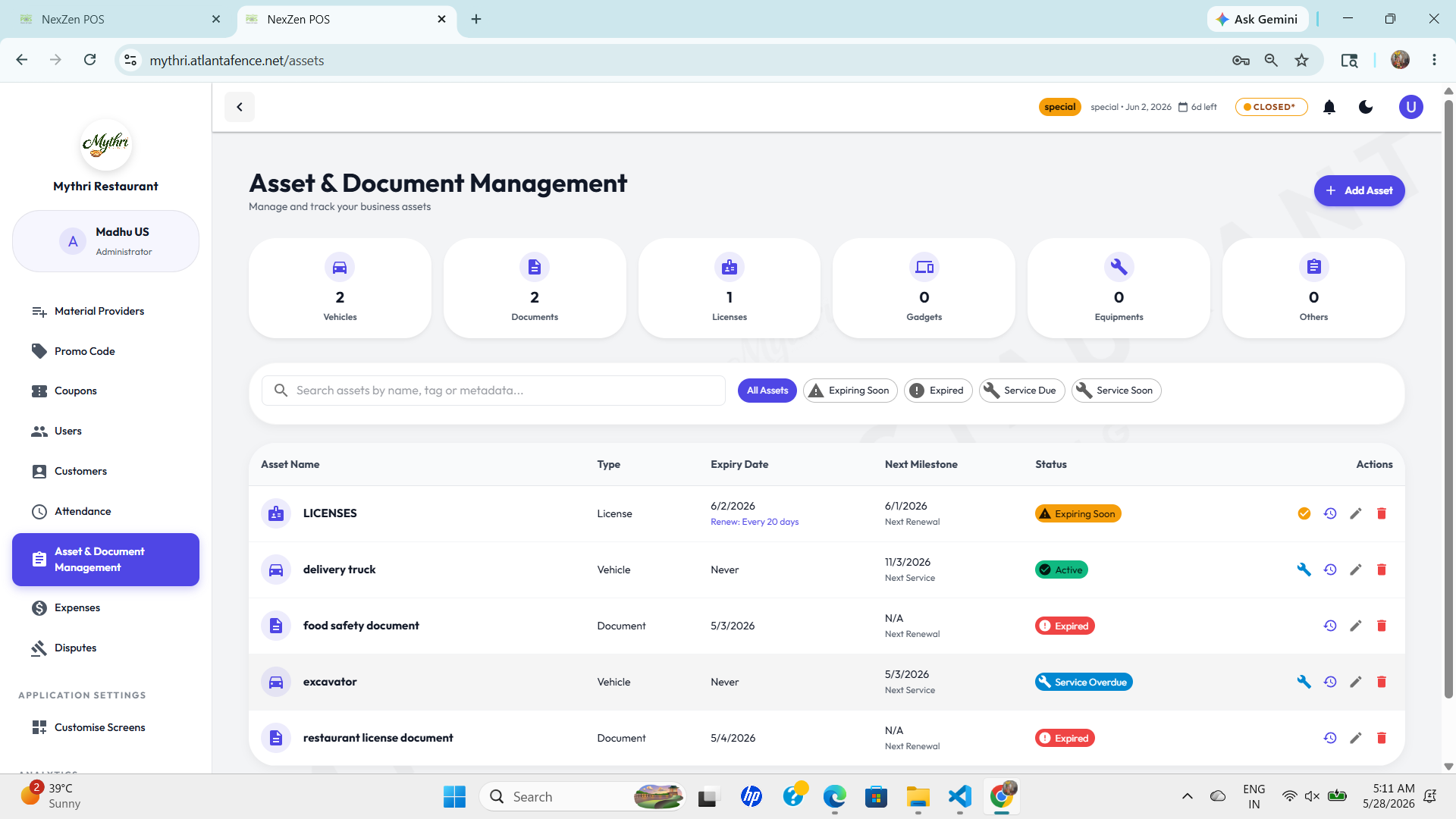
📁 Centralized Asset Dashboard
The asset dashboard gives you an instant view of your most important items, including:
- Asset categories like Vehicles, Documents, Licenses, Gadgets, Equipment, and Others.
- Quick counts for each category so you know exactly how many items are being tracked.
- Status indicators for Expiring Soon, Expired, Active, Service Due, and Service Soon.
🚗 Vehicles
Track delivery trucks, cars, and other vehicles with service milestones and expiry dates for permits or insurance.
📄 Documents
Keep all food safety, compliance, and operational documents in one searchable list.
🧾 Licenses
Monitor license expiry dates and renewal schedules to avoid compliance gaps.
🔧 Equipment
Register ovens, refrigerators, and kitchen gadgets with service and maintenance tracking.
🔍 Search, Filter, and Sort
The asset page includes powerful controls to find the right item fast:
- Search by name, tags, or metadata to locate assets instantly.
- Filter statuses to only show Expiring Soon, Expired, Service Due, or Service Soon items.
- Sort by expiry date so you can prioritize renewals and maintenance.
➕ Add New Asset
Click the + Add Asset button to register a new asset or document. The form is organized into multiple sections to capture all critical information:
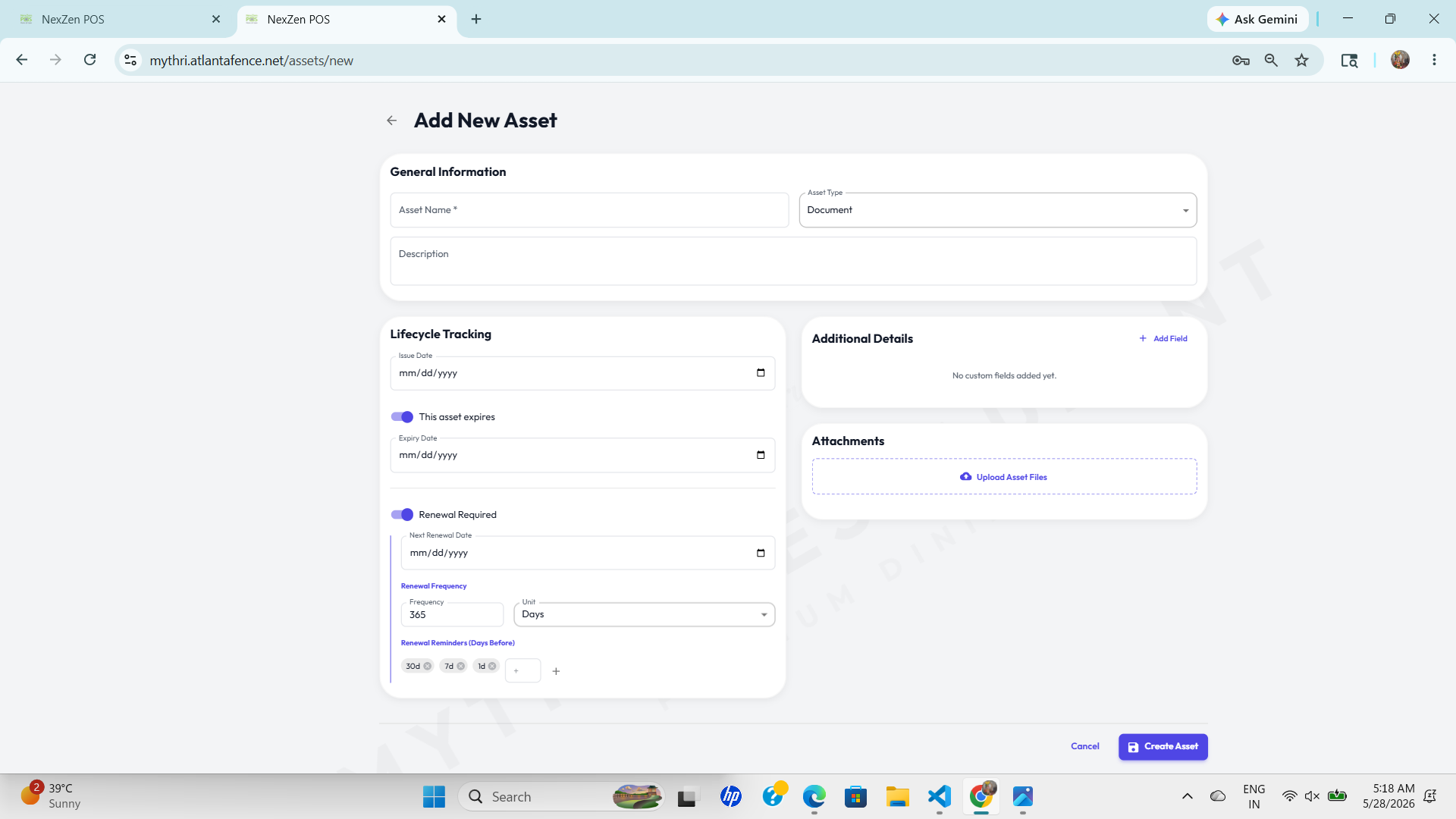
📋 General Information
Enter the basic asset details:
- Asset Name: Enter a clear, descriptive name (e.g., "Delivery Truck", "Food Safety Certificate").
- Asset Type: Select from Document, Vehicle, License, Gadget, Equipment, or Other.
- Description: Optional field to add context about the asset.
📅 Lifecycle Tracking
Manage expiry dates and renewal schedules to prevent compliance issues:
- Issue Date: Set when the asset was acquired or issued (mm/dd/yyyy format).
- This asset expires: Toggle ON to enable expiry tracking. Once enabled, set an expiry date.
- Renewal Required: Toggle ON if this asset needs periodic renewal (e.g., licenses, insurance).
- Next Renewal Date: Set the next renewal deadline.
- Renewal Frequency: Specify how often renewal occurs (e.g., every 365 days).
- Renewal Reminders: Choose reminder timing—30d, 7d, 14d before renewal, and custom intervals.
🏷️ Additional Details
Add custom fields to capture asset-specific information:
- Click "+ Add Field" to create custom attributes (e.g., Serial Number, Insurance Policy, Maintenance Cost).
- No custom fields are required—use only if additional tracking is needed.
📎 Attachments
Upload supporting documents and files:
- Click "Upload Asset Files" to attach licenses, certificates, or photos.
- Supported formats include PDF, images, and other documents for reference.
💾 Create Asset: Click the blue "Create Asset" button at the bottom to save. Use the Cancel button to discard changes.
✅ Status Tracking
Visual badges help teams see which assets need immediate attention:
Expiring Soon
Assets that require action in the next few days, such as licenses or service checks.
Expired
Assets that are past their expiry date and need immediate renewal or replacement.
Service Due
Equipment and vehicles that require maintenance before the next operating period.
Active
Assets currently in good standing and ready for use.