My Profile
View and edit your profile details, update your password, and manage account actions such as deleting your account.
👤 Profile Dashboard
The **My Profile** section gives you control over your account details. It is divided into three main areas for easy navigation.
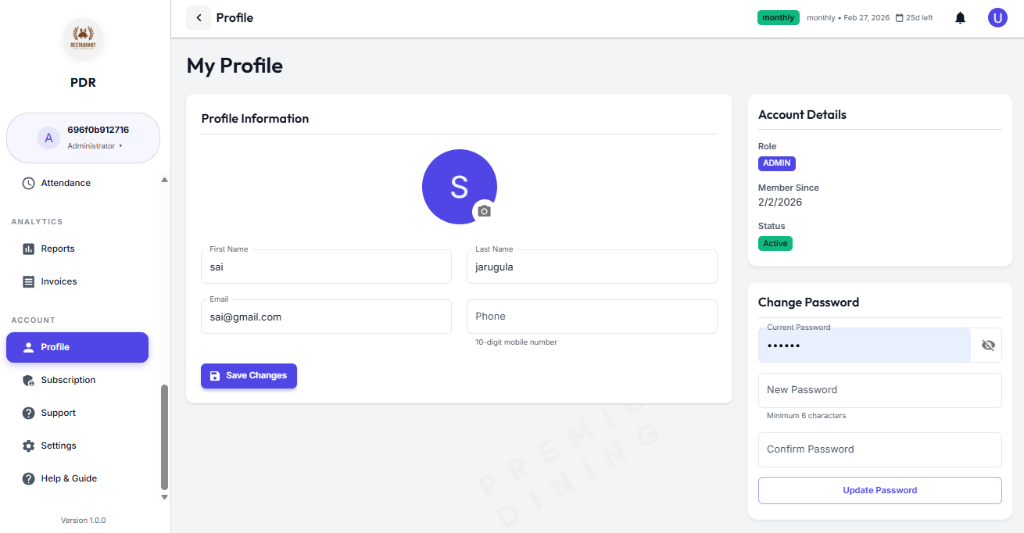
📝 Profile Information
Update your basic contact details here:
- Profile Picture: Tap the camera icon to upload a new avatar.
- Name: Edit your First and Last Name.
- Contact: Update your Email address and Phone number.
🆔 Account Details
View-only information regarding your system status:
- Role: Your assigned access level (e.g., ADMIN, CASHIER).
- Member Since: The date you joined the system.
- Status: Current account state (e.g., Active).
🔐 Security Settings
Secure your account by updating your credentials:
- Change Password: Enter your current password, then define a new one to update your login credentials.