Dispute Management
Review and resolve customer claims and financial disputes from a central dashboard.
🛡️ Dispute Overview
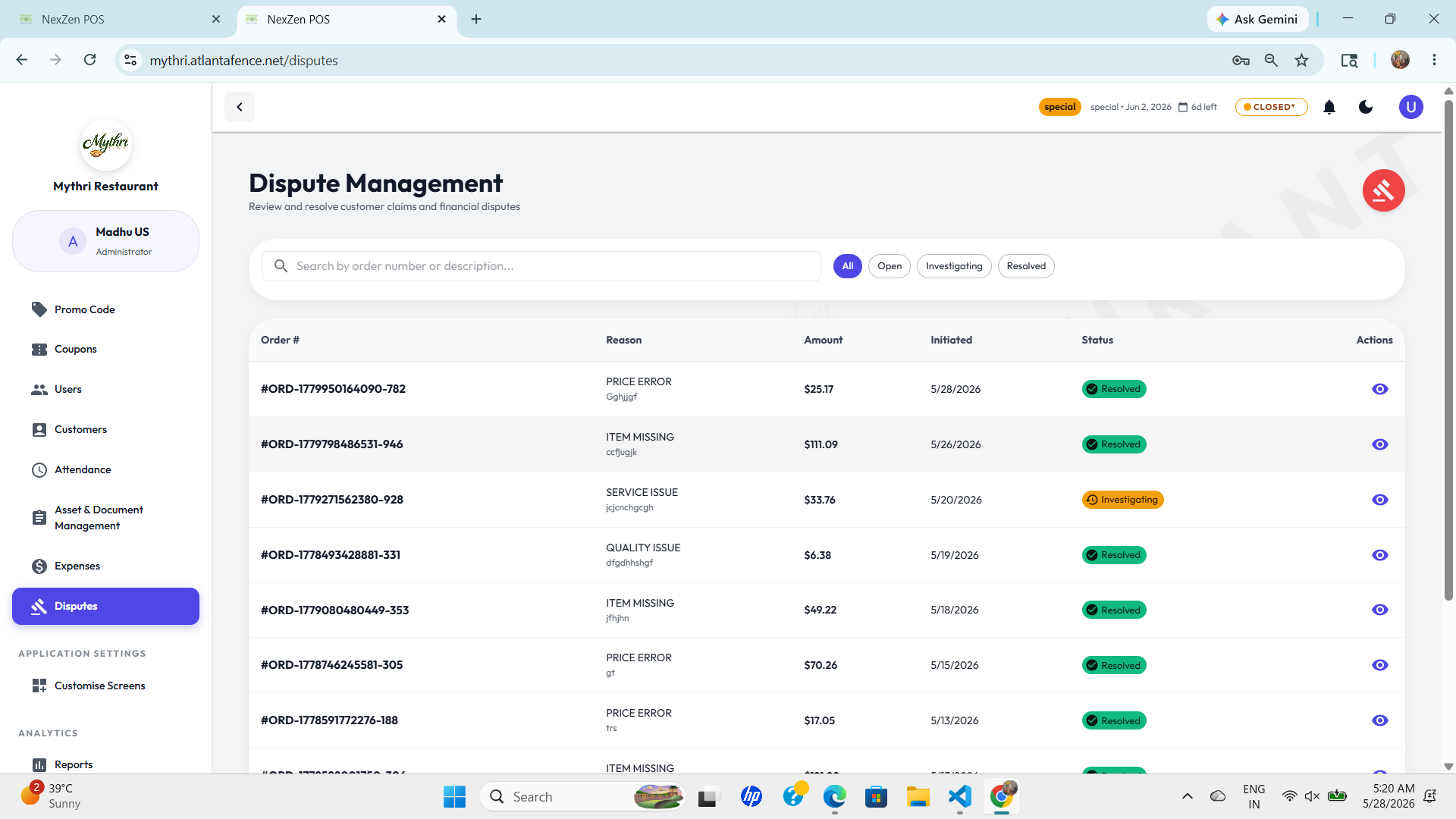
The disputes page provides quick filtering and status tracking for every customer complaint or order dispute.
- Search by order number or description to find the exact dispute quickly.
- Status filters let you switch instantly between All, Open, Investigating, and Resolved cases.
- Action buttons are available for direct task handling such as viewing case details.
👁️ View Dispute Details
Click the eye icon in the Actions column to open the dispute details page. This comprehensive view provides all information needed to investigate and resolve the case.
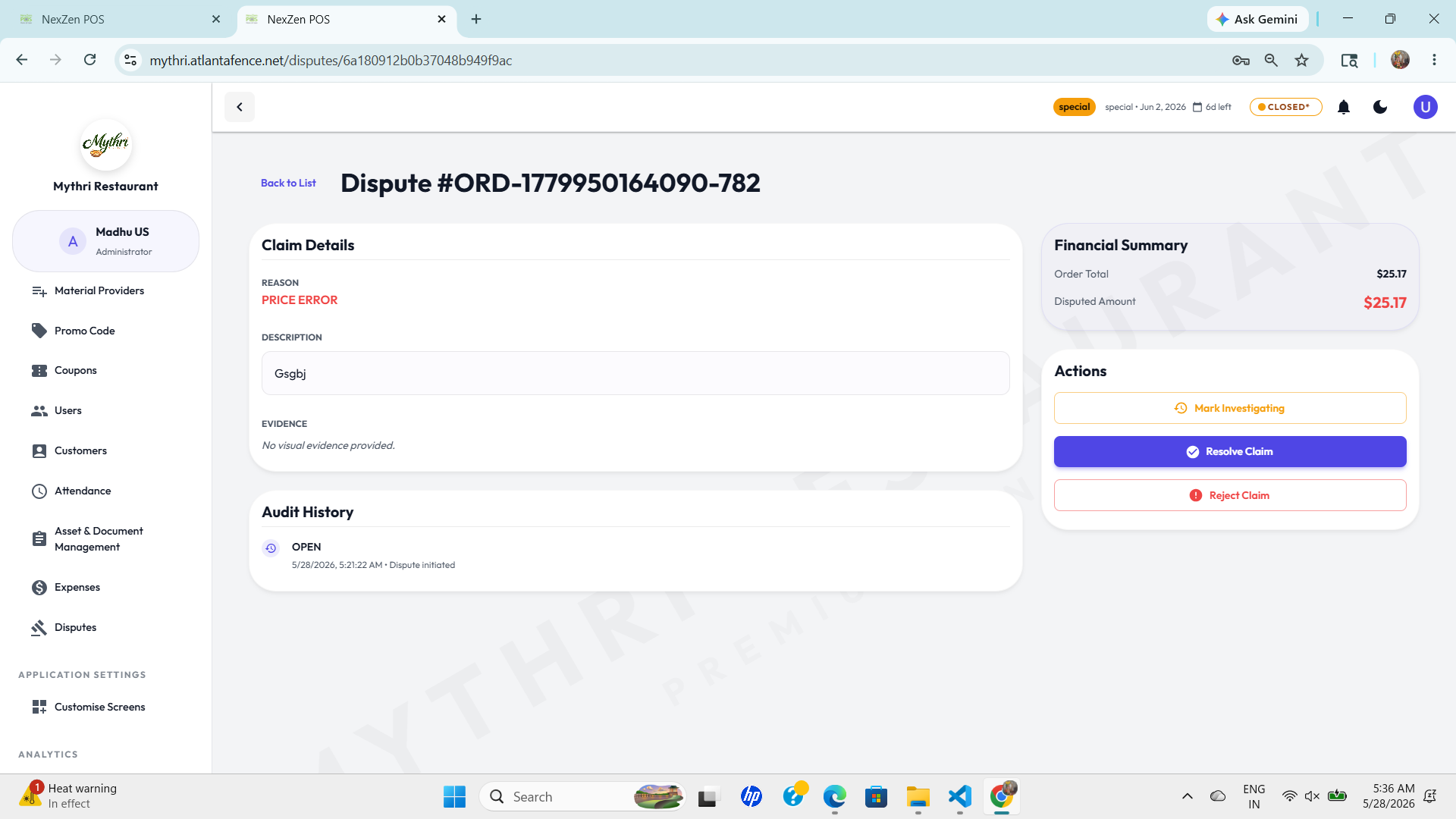
📋 Claim Details
Review the customer's complaint and supporting evidence:
- Reason: The primary complaint (e.g., Price Error, Item Missing, Service Issue, Quality Issue).
- Description: Detailed explanation provided by the customer about the dispute.
- Evidence: Attached files, photos, or documentation supporting the claim. If no evidence is provided, it displays "No visual evidence provided."
💰 Financial Summary
Track the financial impact of the dispute:
- Order Total: The total amount of the original order.
- Disputed Amount: The amount in question or claimed for refund/compensation (shown in red).
⚡ Actions
Use the action buttons to move the dispute through the workflow:
- Mark Investigating: Click to change the status to "Investigating" when you start reviewing the case.
- Resolve Claim: Click to approve the refund/compensation and close the dispute.
- Reject Claim: Click to deny the dispute if it does not meet your criteria.
📜 Audit History
Track every action and status change on the dispute:
- Status Changes: View when the dispute moved from Open to Investigating to Resolved.
- Timestamps: See exact date and time of each action (e.g., "5/28/2026, 5:21:22 AM - Dispute initiated").
- Audit Trail: Complete history ensures transparency and accountability in dispute resolution.
💡 Resolution Tips: Review all claim details and evidence before taking action. Use "Mark Investigating" if you need time to verify the claim. Document your decision clearly in the system.
🔎 Fast case triage
Each dispute entry shows the important details at a glance:
- Order # for the referenced transaction.
- Reason to understand if it is a price error, missing item, service issue, or quality issue.
- Amount and initiated date for proper financial tracking.
- Status badge to identify Resolved and Investigating cases immediately.
📋 Unified Dispute Table
All disputes are listed in one place for faster review with clear column headings and status labels.
🧭 Status Workflow
Track the case journey from open to investigating to resolved, so nothing gets missed.
🕒 Timely resolution
Quickly identify overdue disputes and prioritize them using the dashboard view.
📌 Better Customer Service
Managing disputes efficiently helps improve customer satisfaction and keeps your refund/compensation process transparent.
- Document every dispute clearly so responses are consistent.
- Resolve quality and service issues faster with the right information.
- Keep leadership informed using the dispute status overview.