Orders Management
A unified dashboard for monitoring current and pre-orders with fast search, filter, and order card insights.
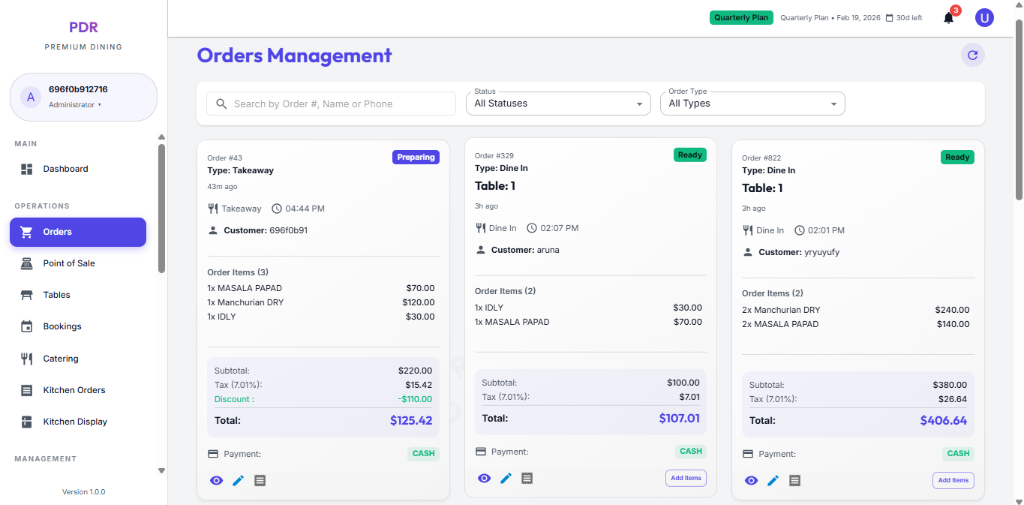
🧾 Current Orders Overview
The Orders Management screen is divided into Current Orders and Pre Orders tabs, giving staff quick access to active workflows.
Use the top control bar to narrow the order feed by:
- Search: Order #, Customer Name, or Phone.
- Date: Select by order date to focus on today’s activity.
- Status: Filter by order stage such as Pending, Completed, or any custom status.
- Order Type: Choose Dine In, Takeaway, Delivery, or All Types.
Filter by Status
Use the Status filter to narrow orders by their current lifecycle stage:
- Pending: New orders awaiting confirmation.
- Confirmed: Order accepted and ready for preparation.
- Preparing: Order is being cooked or assembled.
- Ready: Food is ready for pickup or serving.
- Served: Order has been delivered to the table.
- Completed: Transaction finalized and paid.
- Cancelled: Order was voided or removed.
Order Types
Each order belongs to one of these service channels. Use the Order Type dropdown to filter by type:
- Dine In: Customers order and eat at your restaurant tables.
- Takeaway: Customers order and pick up food themselves.
- Delivery: Food is delivered to the customer's location.
- Online (Web/App): Orders placed through your website or mobile app.
Order Card Layout
- Token Number: Large blue header (e.g., Token No #4) for instant identification.
- Order ID: Unique reference number below the token label.
- Service Type: Shows order method (Takeaway, Dine In, Delivery) with time elapsed and timestamp.
- Status Badge: Top-right colored tag (Confirmed, Pending, etc.) indicating current state.
- Customer Section: Name and phone number for quick contact.
- Items & Pricing: Itemized list with modifiers, quantities, and unit prices.
- Totals: Subtotal, tax calculation, and final total amount.
- Payment Method: Clearly labeled payment type (Cash, Card, etc.).
Card Actions
At the bottom of each order card, quick-action buttons allow staff to manage the order:
- 👁️ View: Opens the Order Details modal with full customer, item, and payment information.
- � Print: Opens the print page for a receipt-style order summary that can be downloaded or printed.
- 📋 Options: Click the menu icon to access additional settings or order notes.
- ❌ Cancel: Void the order from the card if it should not be processed.
- Next Status: The blue button (e.g., "Next: Preparing") advances the order to the next workflow stage.
Order Details Page
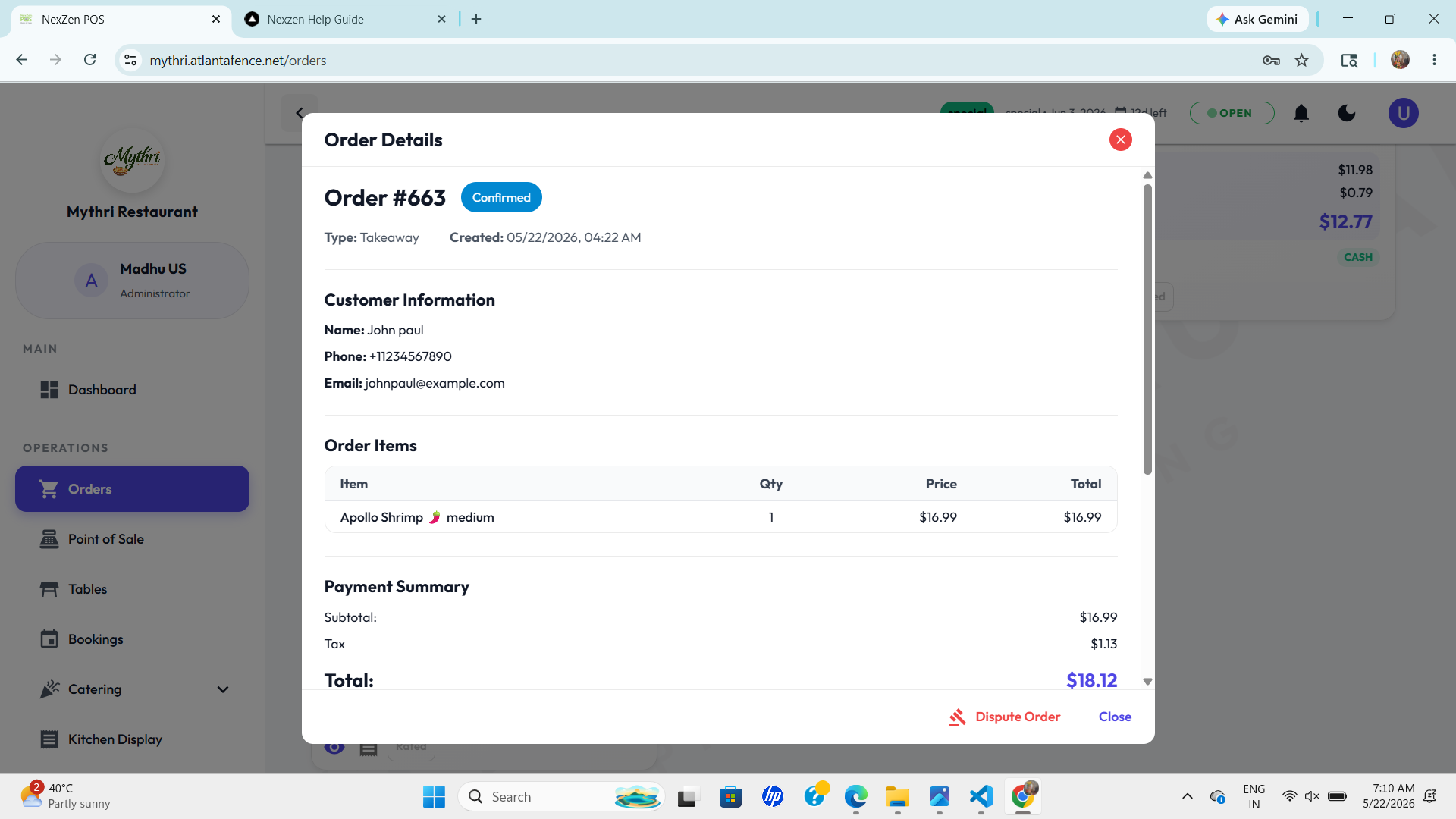
After clicking View, a detailed order screen appears with the following sections:
- Header: Order number, status badge, type, and created timestamp.
- Customer Information: Name, phone, and email for direct contact.
- Order Items: Itemized table showing product, quantity, price, and total.
- Payment Summary: Subtotal, tax, and final total clearly displayed.
- Footer Actions: Buttons like Dispute Order and Close appear in the detail view.
Print Page
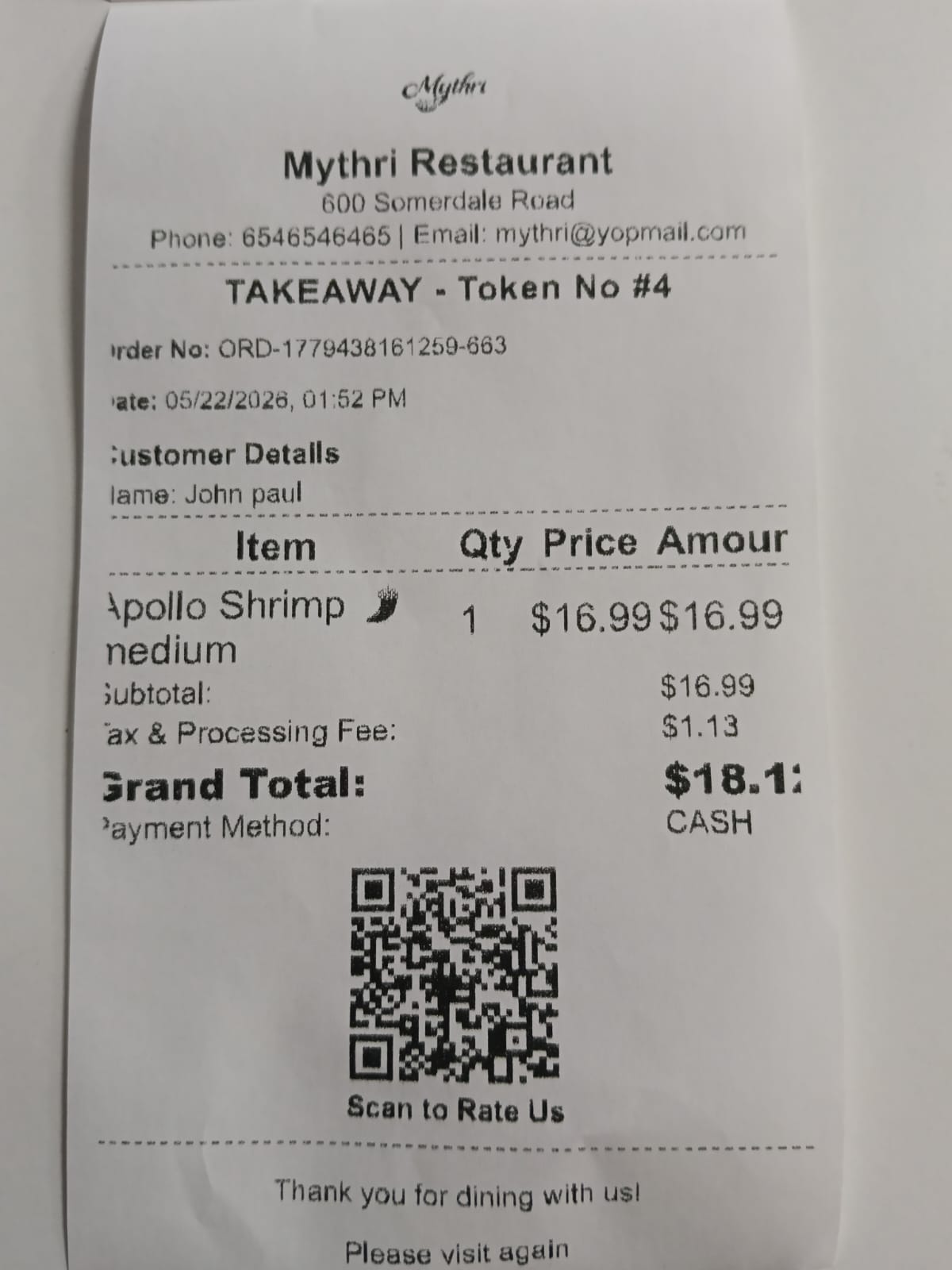
Clicking the print icon opens a dedicated print screen that looks like a receipt or invoice:
- Restaurant Header: Includes your brand, address, phone, and email at the top.
- Order Summary: Displays the order type and token number, plus a unique order reference and timestamp.
- Customer Details: Shows the customer name and basic contact information.
- Item Table: Lists each item, quantity, price, and total amount.
- Totals: Includes subtotal, tax & processing fee, and grand total.
- Payment Method: Clearly shown on the bottom right.
- Print Controls: Footer buttons for Close, Download PDF, and Print.