Kitchen Orders (KOT)
A chef-focused live board for managing active kitchen tickets, urgent items, and ready-to-serve orders.
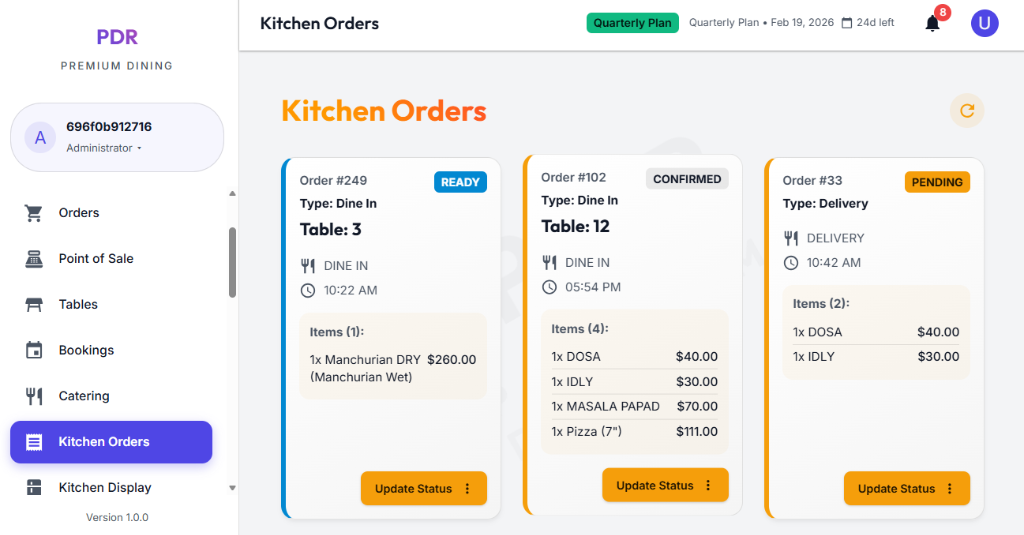
🍳 Live Order Monitoring
The Kitchen Orders screen displays real-time order cards with quick visibility into preparation status and type.
- Live Orders / Pre-Orders: Switch between current kitchen activity and scheduled orders.
- Status counters: See totals for Urgent, Pending, Preparing, Ready, and Total Active.
- Type filters: Filter the view by All Types, Dine In, Takeaway, and Delivery.
- Refresh control: Reload the order feed instantly to keep kitchen staff synced.
📦 Order Card Details
Ticket Header
- Order Number: Prominent top-left label like #663.
- Elapsed time: Shows preparation age (e.g., 70h 4m ago).
- Order type badge: Displays Takeaway, Dine In, or Delivery.
Item Preparation
- Checklist: Tick individual menu items as they are prepared.
- Spice & notes: Shows modifiers like hot or medium and special preparation details.
- Progress bar: Indicates the percentage of items ready.
Quick Actions
- Print KOT: Print the ticket directly from the order card.
- Mark All Ready: Complete the card quickly when the entire order is finished.
- Start / Confirm: Use the bottom button to begin preparation or confirm the order.
🧭 Kitchen Workflow
The kitchen order flow keeps every ticket moving through preparation with clear stage transitions:
- Confirmed: Kitchen has received and accepted the KOT.
- Preparing: Items are being cooked or assembled.
- Ready: Order is complete and waiting for pickup, delivery, or table service.
- Cancelled: Order has been cancelled by the customer or staff.