Wastage Management
Monitor spoilage, damaged goods and prepared food loss in one place so you can minimize waste and protect profitability.
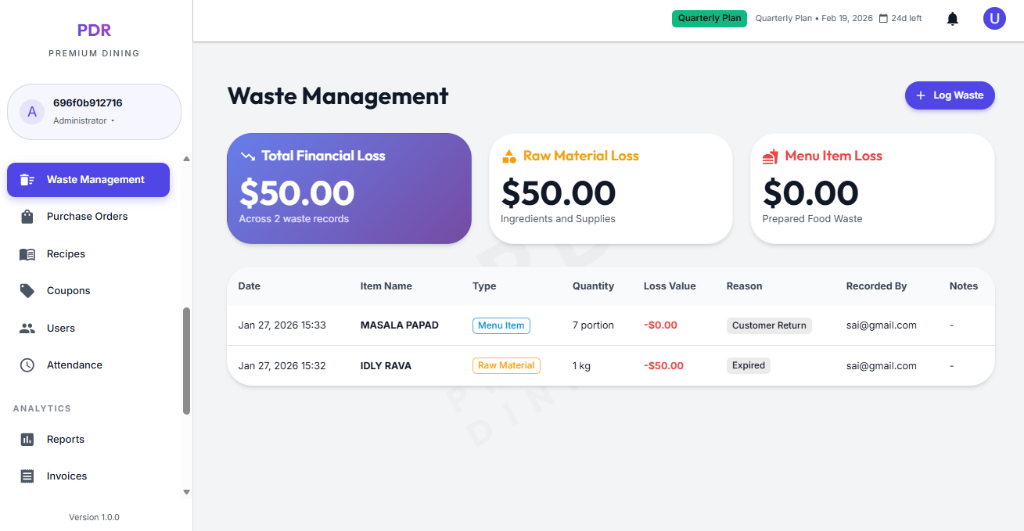
📊 Waste Loss Dashboard
The Wastage Management view highlights total loss and shows the split between raw material waste and menu item loss. This helps you identify whether the biggest impact is coming from inventory spoilage or prepared food waste.
Total Financial Loss
The top summary card shows the combined value of all recorded waste incidents. In the screenshot example, the dashboard reports $56,649.47 across all waste records.
Raw Material Loss
This card tracks losses from ingredients and supplies, such as expired or damaged items. Example: $56,600.00.
Menu Item Loss
This value captures prepared food waste, including damaged plates and returns. Example: $49.47.
📝 Waste Records Table
The table logs every wastage entry with detailed information so you can investigate loss events and track recurring issues.
- Date: The exact date and time of the record.
- Item Name: The raw ingredient or menu item that was wasted.
- Type: Categorized as Raw Material or Menu Item.
- Quantity: The total wasted amount (for example, 2 lb or 11 portion).
- Loss Value: The financial impact of the waste, shown with a negative value when appropriate.
- Reason: Common reasons include Expired, Damaged, and other causes.
- Recorded By: The user who logged the waste event for accountability.
- Notes: Optional details such as the specific issue or context.
➕ Record New Waste
Click the + Log Waste button from the dashboard to open the waste entry modal and record the loss event.

- Item Type: Choose Raw Material / Inventory or a menu item category so the system knows whether the loss applies to ingredients or prepared dishes.
- Select Material: Pick the specific item being wasted. This field is required to calculate the correct stock and unit.
- Quantity: Enter the amount wasted using the numeric input. The modal supports values up to 99,999.
- Unit: Automatically displays the unit of measure for the selected item, such as kg, lb, portion, or dozen.
- Reason for Waste: Choose why the item was discarded, such as Expired, Damaged, or other common causes.
- Notes / Details: Add optional context or additional remarks for the record.
- Record Waste: Submit the entry with the button in the bottom-right. Use Cancel to close without saving.