Kitchen Display System (KDS)
A live kitchen board that keeps chefs and service staff aligned with order preparation status and token-based workflows.
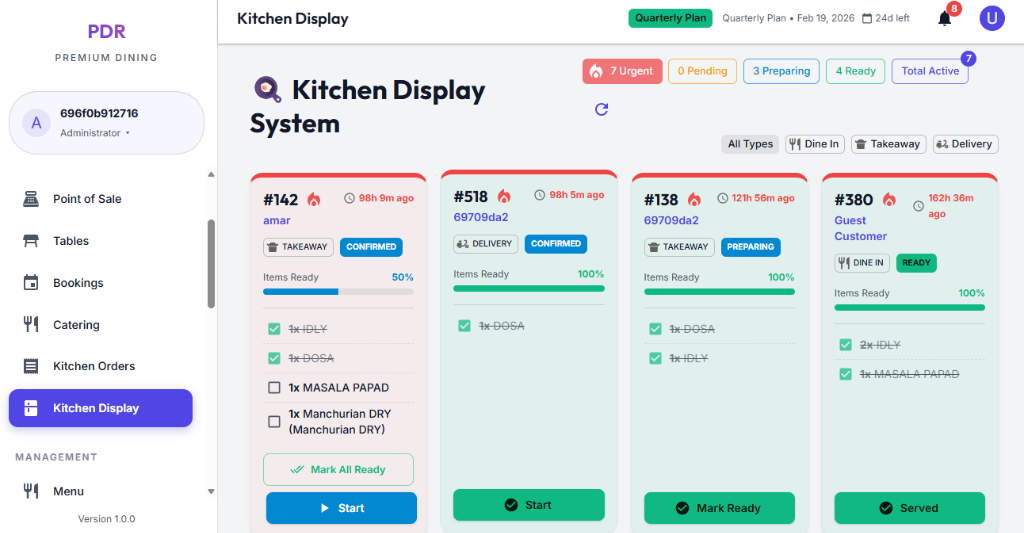
📟 Live Status Summary
The top bar shows real-time order counts so the kitchen can instantly assess workload and urgency.
- Pending: New or unstarted orders waiting to enter preparation.
- Preparing: Orders currently being cooked or assembled.
- Ready: Orders completed and awaiting pickup or service.
- Total Active: Full count of all open kitchen tickets.
🎚️ Filtered Ticket View
Use the filter pills to narrow the display by service type and reduce noise for the kitchen staff.
- All Types: View every active kitchen ticket.
- Dine In: Focus on orders that need table service.
- Takeaway: Show only packaged pickup orders.
- Delivery: Display orders destined for delivery.
🧾 Token Card Layout
Token Header
- Token No: Large card header for easy identification.
- Status badge: Shows Confirmed, Pending, or other stage labels.
- Order ID: Displays the actual order reference (e.g., #663).
Order Details
- Service type: Shows whether the order is TAKEAWAY, ONLINE TAKEAWAY, or another channel.
- Time stamp: Displays when the order was placed or last updated.
- Items ready: Summary of completed items and progress percentage.
Order Totals
- Total items: Shows the number of dishes included in the ticket.
- Progress meter: Reflects how many items are already cooked or ready.
- Quick decision: Helps the kitchen prioritize whether the ticket needs immediate action.